
Make your first wheel
Add names or choices, set the look, and run a clean first spin.
Start hereFind a quick fix or learn the feature properly. Every answer below is written for the ChoiceSpin that is available today.
Updated .

Start with the task in front of you. Each path takes you to a focused group of answers instead of making you read the whole page.
Add names or choices, set the look, and run a clean first spin.
Start hereUnderstand equal odds, weights, repeats, and the result history.
See how picking worksKeep a wheel on this device, move it with a file, or show it on screen.
Explore your optionsYou do not need an account. Open the wheel, replace the sample entries, check the settings you care about, and spin.
Type one option per line or paste a list.
Choose colors, sounds, images, and timing only if you need them.
Confirm the active entries, then use the Spin button or wheel center.
Review history, remove the winner, save the wheel, or export the result.
Modern browsers give ChoiceSpin fresh random values for each pick. Equal entries start with equal odds; weights change those odds only when you change them.
Read the fairness guideMy Wheels keeps saved projects in this browser. A downloaded .wheel file is the reliable way to make a backup or open the same wheel somewhere else.
Your active wheel and My Wheels stay in this browser. When Share is available, you can request an unlisted link. The link is ready only after ChoiceSpin confirms that it was created. A downloaded .wheel file is a separate backup, and the Gallery stays separate from private wheels.

Browse by topic or use the search above. Every question stays in the page HTML, so it remains readable without JavaScript.
Try fewer words, browse a topic, or ask ChoiceSpin.
The basics for building a wheel and getting it in front of people.
ChoiceSpin is a free browser-based wheel spinner and random picker.
Use it for names, teams, review questions, giveaways, games, or ordinary decisions. The main wheel works without creating an account.
You can add names, words, short phrases, numbers, emojis, and option images.
Keep labels short enough to read on the slice. If the label is long, use the full result display to show it after the spin.
You can paste up to 2,000 entries. At least one entry is needed to spin, and the first 1,000 are active by default.
If you need more than 1,000 active choices, raise Entries Visible before spinning. The wheel picks only from the currently active entries, so check that setting after pasting a very large list.
Yes. Those are all normal uses for the wheel.
For classroom ideas, see ChoiceSpin for teachers. For visible draws on a stream, see ChoiceSpin for streamers and creators.
Use fullscreen mode, increase text size, and keep the entry labels short.
Hide editing panels before presenting, raise browser zoom only if the wheel still fits, and test the result popup from the back of the room.
What decides a winner, why repeats happen, and what weights change.
Each spin asks the browser for a fresh random value and maps it to the active entries and their weights.
Modern browsers use crypto.getRandomValues(); a compatibility fallback exists for older browsers. ChoiceSpin does not claim an external randomness certification. Read the full fairness explanation.
The picker chooses the result first, then animates the wheel so that result lands under the pointer.
With equal slices, every active entry has the same share. With weights, each entry receives a share proportional to its visible slice size.
A fair random picker can repeat a result.
Random does not mean “take turns.” If you need no repeats, turn on automatic winner removal or remove the winner manually after each spin.
No. Shuffle changes the order of entries, not their odds.
Use it when you want a different visual order. Equal weights remain equal before and after shuffling.
Yes. Advanced mode lets you give entries different weights.
A larger weight creates a larger slice and a larger chance. Do not describe a weighted draw as equal; the wheel makes the difference visible on purpose.
Open the Results area to see recent winner labels and timestamps stored in this browser.
You can clear that history when you no longer need it. It is local data, so another browser does not receive it automatically.
Change the look and behavior without losing sight of the actual draw.
You can change colors, text, sounds, timing, wheel appearance, pointer details, page background, and result behavior.
Open Customize and work one tab at a time. The default settings are fine if you only need a quick pick.
Yes. Open Customize, find the during-spin controls, and choose the duration.
A shorter spin is useful for repeated classroom picks; a slightly longer spin can be easier to follow on a stream.
Yes. During-spin and after-spin sounds have separate choices and volume controls.
Mute them before a quiet class or meeting, and test browser audio before a presentation.
Yes. You can use a wheel background, a center image, and images for individual options.
Uploaded images are read and stored locally by the browser. Large images can use more browser storage, so resize them first when practical.
Advanced mode adds per-entry controls such as weights and richer entry settings.
Use it when equal plain-text entries are not enough. For an ordinary fair draw, the basic editor is simpler.
Yes. Turn on the after-spin option that automatically removes the winner.
This is useful for drawing without replacement. Check the remaining entry count before the next spin.
Know what stays in this browser and what you need to carry elsewhere.
Use Save to keep the project in My Wheels on this device.
For a separate backup, download a .wheel file. The backup is especially important before clearing browser data.
My Wheels is the local library of projects you saved in this browser profile.
It can include entries, appearance, options, and local images. It is not a cloud account and does not sync automatically.
Not automatically. My Wheels belongs to the browser and device where you saved it.
Download the wheel as a .wheel file, move that file safely, and open it on the other device.
Yes. ChoiceSpin can save a portable .wheel file and open it again later.
The file stays under your control. Treat it carefully if the entries contain names or other personal information.
No. Editing the open wheel does not silently rewrite every saved copy.
Save the updated version again when you want My Wheels to keep those changes, and download a new backup if the file should match.
It is usually because you opened a different browser profile, used private browsing, or cleared site data.
Check the original device and profile. A downloaded .wheel backup is the safest recovery path because local browser storage may be erased.
Save keeps a wheel in My Wheels on this device. Download makes a separate .wheel backup. ChoiceSpin may show Share and Spin With Friends when those features are enabled, but seeing a control does not guarantee that its hosted service is available. A Share link or live room is ready only after ChoiceSpin confirms that it was created.
You can browse wheels that were intentionally published to the public Gallery. A private wheel is never added automatically.
To publish your wheel, open Share, choose Public gallery, add a title and description, and select Publish to Gallery. Use the link after publishing succeeds. The Gallery list can take a few minutes to refresh. Public wheels support text and emoji, and anyone can read, spin or copy them. Keep personal and sensitive information out of public wheels.
When the Spin With Friends control is available, requesting a live room sends the wheel content to the hosted service before ChoiceSpin can confirm whether creation succeeded. For a request that ChoiceSpin confirms, Spin With Friends creates a room for up to 32 active participants and up to 6 hours. Use the room only after that confirmation. Anyone with the room link can join or forward it. After creation, spins and room chat are also sent to the hosted service so everyone can stay in sync.
The room owner controls whether visitors can edit the wheel, spin it, or use chat. Those controls reduce unwanted changes, but they do not make the link secret. Do not use a live room for confidential, personal, or sensitive student information.
Yes. Capture the browser window or display it fullscreen, then use your streaming or screen-sharing software.
ChoiceSpin does not publish directly to TikTok or Instagram. See the streamer guide for OBS-style window capture, browser presentation, and visible results.
Yes. After a completed spin, you can save the winner result as an image and, where the browser supports it, as a short video.
Use the result tools after the winner appears. Video export also needs the exporter to load correctly and the browser to support the required encoding.
First complete a spin, then try again in a current desktop browser.
If the video action is still unavailable, the browser may not support the encoder or a required export module may not have loaded. Save an image of the result instead.
What stays local, what leaves only after an action, and where to ask for help.
No. The current main wheel does not require sign-up.
Saved projects use local browser storage, which is why they do not appear automatically on another device.
No. Advertising and analytics do not choose or change a winner. The result comes from the active entries, their weights, and the wheel’s browser-based random selection.
On eligible public pages, ChoiceSpin uses cookie-free Vercel Web Analytics for basic visits and Vercel Speed Insights for performance. Google Analytics measures public page views and, where ChoiceSpin does not ask first, up to three finished spins of the main wheel per page load, plus fixed Gallery actions when permitted. It does not receive wheel entries or results. Google's own European privacy message is not shown on ChoiceSpin at the moment, so in the EEA, the UK and Switzerland ChoiceSpin asks first, and Google Analytics runs only if you accept. Elsewhere it runs unless you refuse. Use Analytics choices at the bottom of the page to change your choice. No ads are shown yet. ChoiceSpin has applied to show ads through Google AdSense; the Privacy page explains how Google may use advertising cookies once ads run, how to opt out, and the exact measurement boundaries, and the Cookies page lists those cookies.
No. Avoid confidential information, personal details, and sensitive student data. Use first names, initials, or neutral placeholders when that is enough, and follow your school or workplace policy.
Your active wheel and My Wheels normally stay in browser storage. Requesting Share or Spin With Friends sends the wheel content to the hosted service before ChoiceSpin can confirm whether creation succeeded. A confirmation proves that a usable link or room exists; a failed or unclear response does not prove that no data was sent. People who receive a confirmed link can see its wheel content. Live rooms also send spins and chat. These links are not end-to-end encrypted.
ChoiceSpin has an official embed mode for placing a wheel on another website. It includes a documented, versioned browser message interface for controlling that embedded wheel.
The message interface is limited to the embedded wheel. ChoiceSpin does not offer a general public HTTP or server API.
Use the dedicated Privacy, Cookies and browser storage, and Terms of Use pages.
Privacy explains what leaves your browser and who receives it. Cookies lists what the site stores in your browser. The Terms set the rules for using the site, including publishing to the Gallery.
Open the contact page and send a short message with what you were trying to do.
Include the browser, device and the steps that led to the problem. The contact form cannot attach files, so email any screenshot to choicespin@gmail.com instead, and only if it shows no private information.
Go deeper only where it helps your real use of the wheel.

Student picking, groups, review games, classroom jobs, and projector tips.
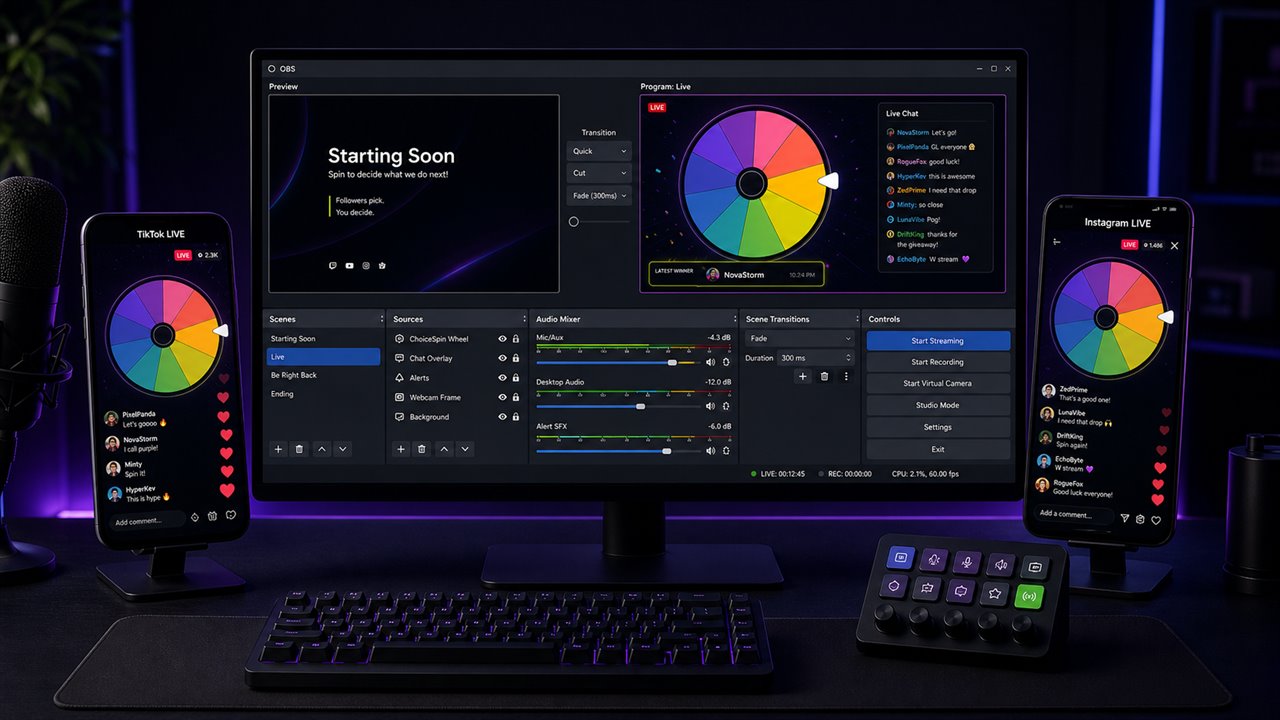
Use window capture or screen sharing for TikTok, Instagram, YouTube, Twitch, and calls.
See how equal odds, weights, browser randomness, and result history fit together.
Tell us the task, device, and browser. A clear report is easier to solve.