
Recent results on screen
The visible Results tab shows browser-local recent winners for convenient reference, not proof.
Viewers trust what they can actually watch. ChoiceSpin puts your giveaways, challenges, and content decisions on a wheel that lands live on screen, with browser-local recent results you can keep visible.
Open the giveaway pickerIf you announce a winner from a spreadsheet, viewers just have to take your word for it. Spin a wheel on screen instead and they watch the exact moment the winner lands under the pointer. For a long list, show the entries before the draw, because labels on a big wheel get too small to read and text on very narrow slices may be left off. An omitted label does not remove that entrant from the draw or change their odds.
Winning names also appear in the visible, browser-local Results tab. When someone joins late, that recent history can help them follow the session, but it is not a receipt, proof, audit record, or authoritative participation record.
The visible Results tab shows browser-local recent winners for convenient reference, not proof.
Use the Browser Source, screen capture, or window capture that your current streaming app and operating system support.
Streams and screen sharing let viewers watch the same spin and browser-local recent results.
ChoiceSpin runs in a browser, but capture support changes by app version, account, and operating system. OBS can use Browser Source or supported window capture; Streamlabs Desktop documents screen and window capture; TikTok LIVE Studio documents computer-screen capture. Test the exact scene privately on the device and account you will use.
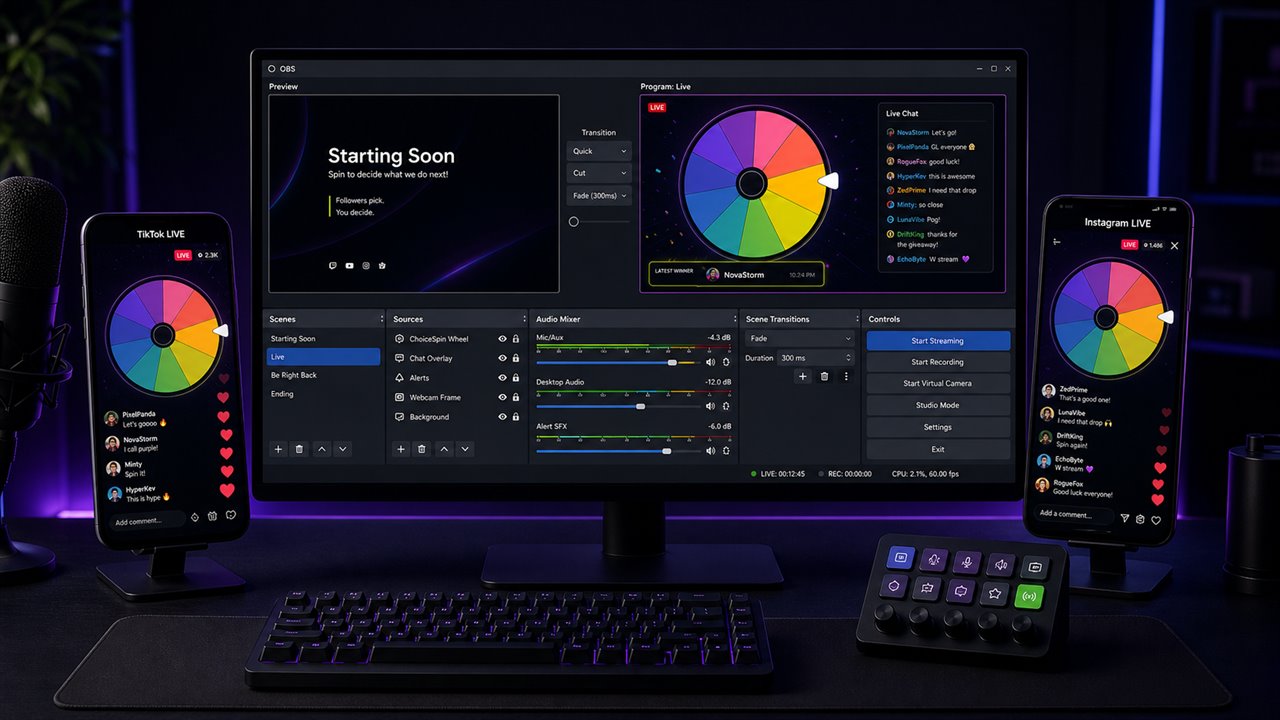
OBS or Streamlabs Desktop: open your wheel in its own browser window, switch on Fullscreen mode for a clean layout, and add that window with a capture source supported by the current app version and operating system. Fullscreen hides the entry list and Results, so leave it off if you want recent results on screen.
Browser Source in OBS: the OBS wheel guide shows how to put a wheel with a Transparent background from the embed builder into a Browser Source. For a wheel on your own site or overlay page, the website embed guide covers the one-snippet version.
TikTok LIVE Studio: capture the ChoiceSpin browser window and choose a layout supported by your version. Check the previews available for that layout and run a private test before a real draw.
Instagram Live: check which Live tools your account currently offers. Use only the mobile or streaming-software workflow supported by your account, and test it privately before planning a draw around browser capture.
You can make it match your brand too. The Customize panel controls wheel colors, sounds, and background, and you can put images on slices, whether that's emotes, game icons, or your logo in the wheel center.
One honest note: for regulated contests and sweepstakes, platform rules and local laws are on you. ChoiceSpin is built for everyday community draws.
Collect entrants and paste them into the giveaway winner picker, one per line (up to 2,000). The wheel only draws from the first 1,000 lines until you raise Entries Visible in Customize, so raise it for a longer list.
Show the wheel on stream and spin. The winner lands in front of everyone, and the name is added to the browser-local Results history for convenient reference, not as proof or an audit record.
Giving away more than one prize? Auto remove winner can reduce repeats while at least two non-empty list lines remain. With Show Duplicates on, only one matching line is removed, so the same displayed name can win again if another copy remains. Advanced mode removes the row that won; a plain list loses its first copy. With Show Duplicates off, all exact copies are removed only when two other lines will remain (in Advanced mode, every enabled row with that name; hidden rows are kept and stay off the wheel). In a live room, Auto remove winner acts only in the browser that spun, and only if that browser may edit the room; it takes out only the winning copy. A guest who may spin but not edit removes nothing, and your own setting does not remove a guest's winner, so delete that line yourself before the next prize. Handle the final two entries manually. In Advanced mode the remaining rows keep their weights, images and hidden status.
For bonus entries, keep Show Duplicates on. Each repeated copy is a separate slice only while it is enabled and inside Entries Visible, so copies past that limit do not appear on the wheel. In a live room Show Duplicates and Entries Visible do not apply and each line with text gets a slice, so add bonus lines on purpose and delete accidental repeats before you start. Equal chances also need equal Advanced weights, and a changed weight changes the odds. Weights count on every tab while Advanced is on. The Turn off Advanced button on the Entries tab returns to a plain list with equal slices and removes weights, images and hidden entries. Explain those rules before the draw. The fairness page explains exactly how winners are selected.
The same wheel that draws winners can run your segments. Load it up with forfeits and let chat watch your fate land, or spin a truth or dare wheel on a collab. You can even put your backlog on a decision wheel and let the spin pick what you play next.
Sub goal hit? A celebration wheel of dares, songs, or challenges gives the moment a payoff everyone can watch and nobody picks by hand.
Keep the wheel in the captured browser window and every viewer sees the same spin through your stream. For a smaller remote group, share the wheel window in a video call and keep the browser-local recent Results history visible as a convenience.
Use the stream or call you already moderate so you control who can watch and respond. Spin With Friends, below the entry list, can also open a live room: anyone with the link can join (up to 32 active people, for up to 6 hours), and you choose whether guests can spin, edit the wheel or chat. When Advanced mode is on, joining or creating a room turns it off the same way the Turn off Advanced button does, usually after a question. If your Advanced list cannot become a plain list, or does not fit a new room, nothing changes and the page says why. Room lists have a size limit too: a room takes at most 500 lines and 20,000 characters of entries, or fewer characters when a long list uses emoji, accented letters or non-Latin scripts. For a giveaway, use your stream or screen share as the official result. Ask everyone in the room to reload the page before a giveaway, so no browser is still running an older copy of ChoiceSpin.
If you run the same wheels every week (a giveaway template, a forfeit wheel, a game picker), save them to My Wheels in this browser and load them from the My Wheels menu before you go live.
Need a mod or co-host to run the draw? Share makes an unlisted link that expires after 24 hours, and anyone who has it can use or forward it. Share links carry plain wheels only, without images, weights, hidden entries or an Entries Visible limit above 1,000. For a branded wheel, send the file from Download and have them use Open.
In OBS, capture the browser window, or add a Browser Source with a Direct URL from the embed builder. The OBS wheel guide walks through that setup, including the Transparent background. In Streamlabs Desktop, use a supported screen or window capture. Fullscreen mode gives a captured browser window a cleaner layout. Options depend on the current app version and operating system, so test the scene privately before going live.
TikTok LIVE Studio can capture the ChoiceSpin browser window. Check the layouts and previews available in your version. For Instagram Live, check which mobile or streaming-software tools your account offers. Use only a supported setup and test it privately before a real draw because platform options can change.
Yes. They can watch through your stream or a group call where you share the wheel window. For a smaller group, Spin With Friends opens a live room that anyone with the link can join, up to 32 active people for up to 6 hours, and everyone in it sees the same winner. On every device in the room, Show Duplicates does not change the room's slices. A guest whose wheel shows the list used for that spin sees it turn; one whose wheel shows a different list, for example because the list was just edited, sees the winner without the wheel turning. You choose whether guests can spin, edit or chat. Guests get the entry text and wheel colors; pictures stay on the host's device, so a guest sees a picture-only line as a plain colored slice, and a room list can have at most 500 lines, or fewer when long entries use emoji, accented letters or non-Latin scripts. For a giveaway, use your stream or screen share as the official result.
A browser wheel cannot provide proof of a giveaway. Run the draw on screen, show the entries and settings, and point viewers to the fairness page, which explains how the winner is selected. The browser-local Results history is a convenience for following recent spins, not an audit record. Use a separately reviewed verified-draw system when you need stronger evidence.
Yes. You can customize wheel colors, sounds, and the page background, add a center image like your logo, and put images on individual slices. Light and dark themes are built in.
No. Spinning, saving wheels, downloading wheel files, and customization are all free, and neither you nor your viewers need an account.
The giveaway picker takes up to 2,000, one per line, but draws from the first 1,000 until you raise Entries Visible in Customize. The embed wheel from the OBS guide takes 2 to 100 typed entries and does not read chat. On the main wheel, very narrow slices may leave out label text while those entries remain in the draw with unchanged odds. The main wheel names the winner in a popup; the embed wheel can name it in the line under the wheel.
Open the giveaway winner picker, paste your entrants, and run a draw your chat can actually watch.